HTAP on MariaDB: ProxySQL in front, reports answered by DBTrail
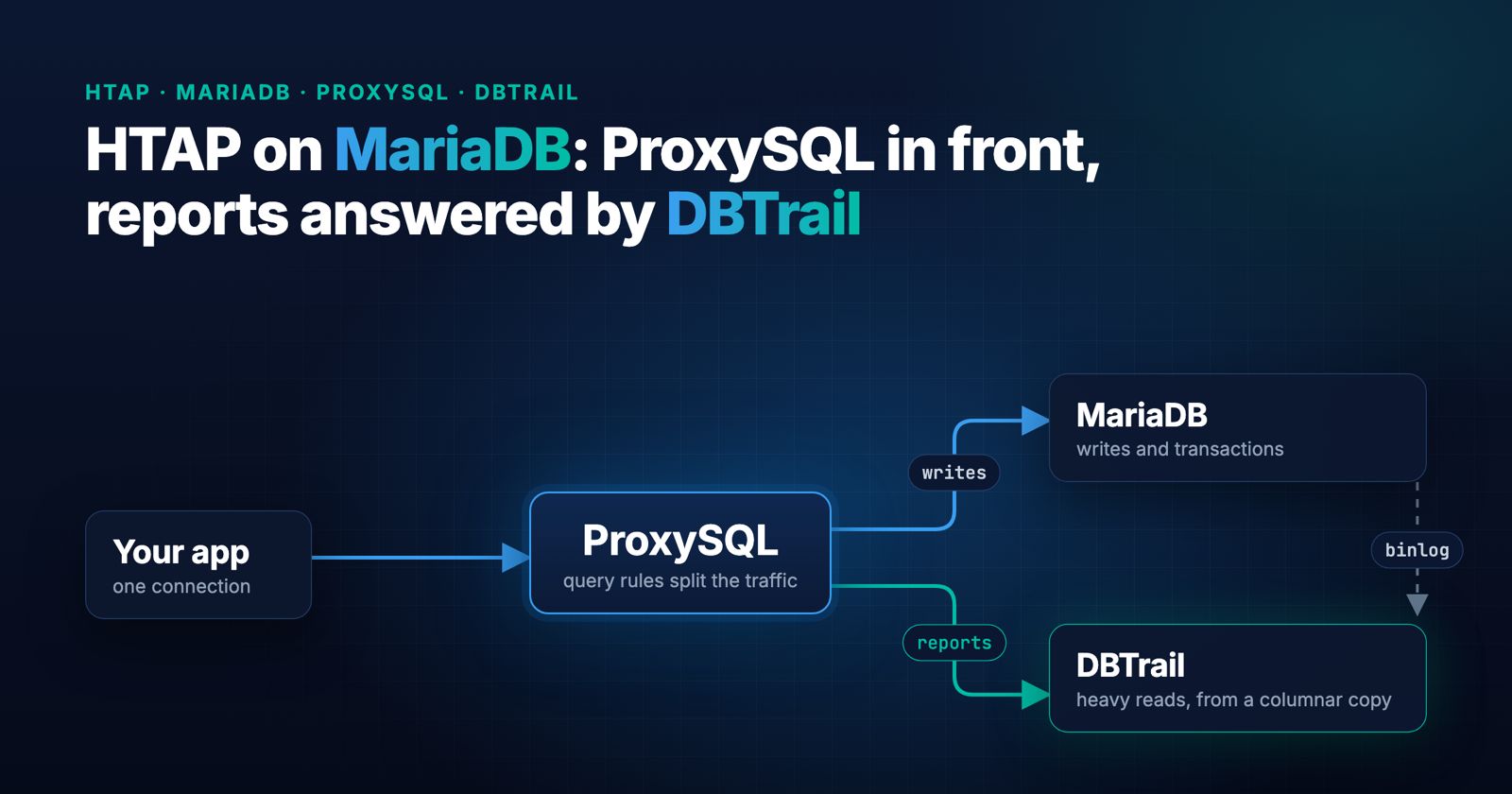
An application writes to MariaDB all day, and someone wants reports on the same data: a count over a whole table, a sum over a few million rows, a page deep into a sorted list. Run them on the primary and the application waits behind them. A replica can isolate the primary, but it may still take a long time to answer the same report. A warehouse fed by a batch ETL job adds another system to operate and can leave reports hours behind.
For hybrid transactional and analytical processing (HTAP), DBTrail keeps a columnar copy of the tables from MariaDB’s binary log and answers heavy reads from it with DuckDB. Its router speaks the MySQL protocol, reads MariaDB’s own plan for each SELECT, and decides per statement: light reads go on to MariaDB, heavy ones are answered by the copy. DBTrail’s router only takes reads, though. An application also writes, opens transactions and locks rows, and it shouldn’t need a second connection string for its reports. That’s the job ProxySQL does here: the application connects to ProxySQL with its usual login, and ProxySQL sends writes and transactions to MariaDB and reads to DBTrail. Nothing changes in the application and nothing changes in MariaDB.
We wanted numbers for that setup with MariaDB as the source, so we benchmarked it. With a 400-transactions-per-second target for the application, the reports on MariaDB took the application’s p95 latency from 13.7 ms to almost 7 seconds, and 12 reports finished. With the same reports going through DBTrail, the application stayed at 13.2 ms and 266 reports finished. The copy was 0.9 to 3.0 seconds behind MariaDB during the test.
The test also found a bug in DBTrail’s routing on MariaDB. It’s fixed in 0.128.0, and it’s explained below.
The setup
Three machines on AWS, all ARM (Graviton):
- MariaDB 10.11.14, the Ubuntu 24.04 package, on an m7g.2xlarge (8 cores, 32 GB), buffer pool 6 GB. Eight sysbench tables of 10 million rows each, 80 million rows in total.
- DBTrail 0.128.0, the Docker Compose installation, on a second m7g.2xlarge. Same size as the MariaDB machine, so DBTrail had its own 8 cores and did not share MariaDB’s. The first copy of the 80 million rows took 4 minutes 20 seconds.
- ProxySQL 3.1.12 and sysbench on an m7g.xlarge.
The application is sysbench oltp_read_write through ProxySQL: 16 threads with a target rate of 400 transactions per second for five minutes. The target rate is the same across runs; it is not a measurement of achieved throughput.
The reports are three queries, each on its own table. Two loops run them in turn for the whole five minutes, also through ProxySQL with the application’s login:
-- R1: a full aggregate over 10 million rows
SELECT k % 100 AS bucket, COUNT(*), AVG(LENGTH(c)) FROM sbtest1 GROUP BY bucket ORDER BY bucket;

-- R2: a range of 8 million rows, grouped
SELECT k % 1000 AS b, COUNT(*), SUM(id) FROM sbtest2 WHERE id BETWEEN 1 AND 8000000 GROUP BY b ORDER BY b;

-- R3: a page five million rows deep
SELECT id, k FROM sbtest3 ORDER BY k LIMIT 20 OFFSET 5000000;
What ProxySQL does in this setup
Run the configuration statements below in ProxySQL’s Admin interface (port 6032). The examples assume a dedicated test instance.
ProxySQL has two hostgroups, 10 for MariaDB and 20 for DBTrail:
INSERT INTO mysql_servers (hostgroup_id, hostname, port) VALUES
  (10, 'mariadb-host', 3306),
  (20, 'dbtrail-host', 3309);
LOAD MYSQL SERVERS TO RUNTIME;
The application’s user defaults to MariaDB, and transaction_persistent=1 keeps every statement of a transaction on the hostgroup where the transaction started:
Replace replace-with-app-password with the application’s actual password, using SQL string escaping as needed.
INSERT INTO mysql_users (username, password, default_hostgroup, transaction_persistent)
  VALUES ('app', 'replace-with-app-password', 10, 1);
LOAD MYSQL USERS TO RUNTIME;
And two query rules decide the rest. Locking reads stay on MariaDB: SELECT ... FOR UPDATE, MariaDB’s SELECT ... LOCK IN SHARE MODE, and the MySQL SELECT ... FOR SHARE form. Every other SELECT goes to DBTrail. Anything no rule matches, writes included, falls through to the user’s default hostgroup, MariaDB:
INSERT INTO mysql_query_rules (rule_id, active, match_digest, destination_hostgroup, apply) VALUES
  (1, 1, '^SELECT .* (FOR (UPDATE|SHARE)|LOCK IN SHARE MODE)', 10, 1),
  (2, 1, '^SELECT ', 20, 1);
LOAD MYSQL QUERY RULES TO RUNTIME;
The rules match on the query digest (the statement with its literal values normalized), so one rule covers every variant of a query, and the application doesn’t have to tag anything. ProxySQL’s monitor checks DBTrail like any other backend: DBTrail answers its ping and its read_only check (it reports 1, since it never takes writes). The full walk-through, logins included, is in the ProxySQL guide.
transaction_persistent matters for how to read the results. sysbench runs its SELECTs inside transactions, so all of the application’s own reads stayed on MariaDB, next to the writes they belong with. DBTrail only took the reports. We verified that using ProxySQL’s own statistics, which count every statement by digest and hostgroup:
SELECT hostgroup, SUM(count_star) FROM stats_mysql_query_digest GROUP BY hostgroup;In the final run that came to about 2.4 million statements on hostgroup 10 (MariaDB) and 906 on hostgroup 20 (DBTrail).
We ran the application alone first to warm MariaDB’s buffer pool, then with the reports on MariaDB (no rules in ProxySQL), then, after a pause and another warm-up, with the reports through DBTrail. Going from one setup to the other was one statement in ProxySQL’s admin interface, LOAD MYSQL QUERY RULES TO RUNTIME. Nothing was restarted: not ProxySQL, not MariaDB, not DBTrail, and the application kept the same host, port and login in every run.
Results
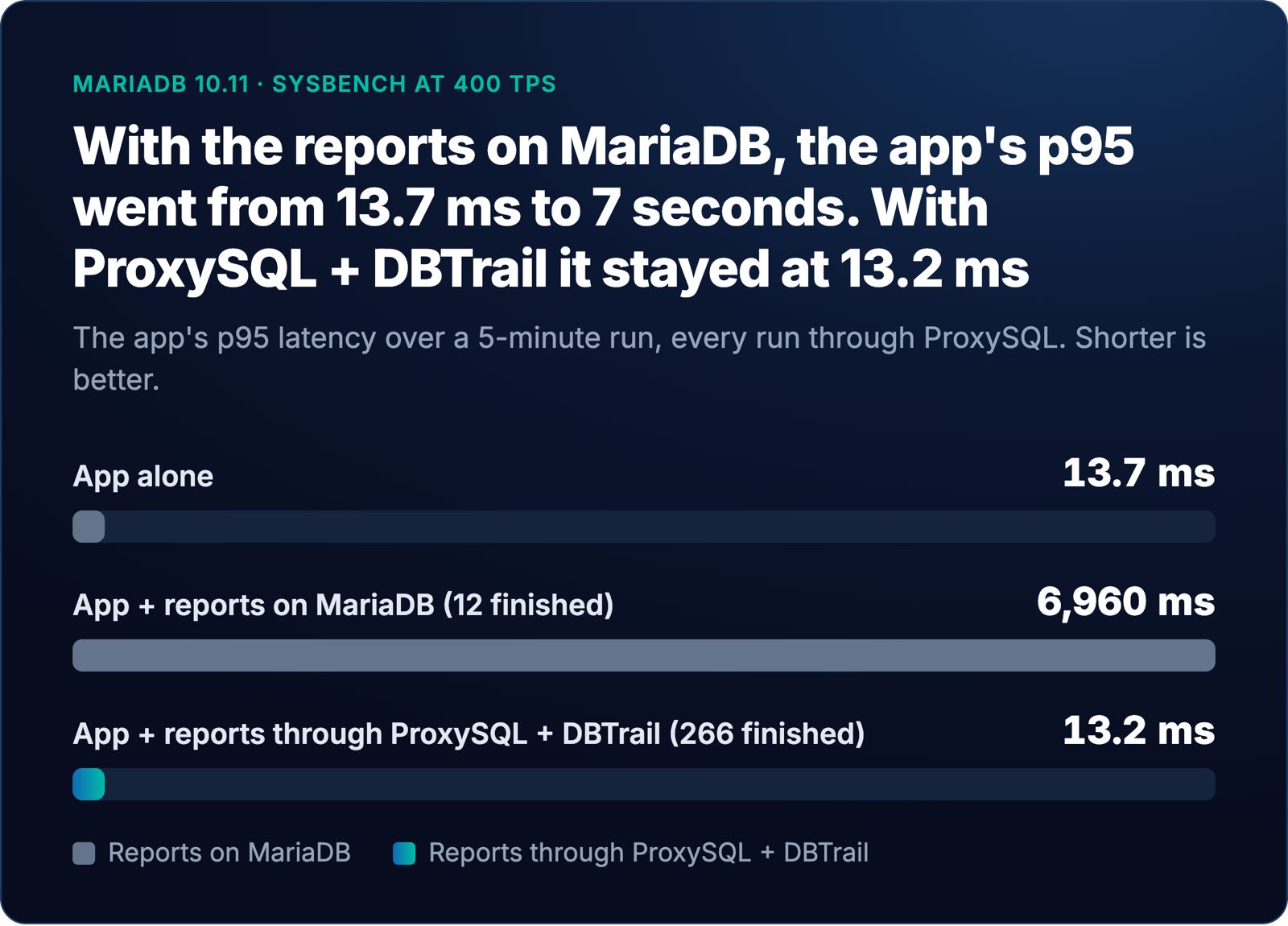
| Workload | App avg | App p95 | App max | Reports completed |
|---|---|---|---|---|
| App alone | 10.7 ms | 13.7 ms | 31 ms | none running |
| App + reports on MariaDB | 1,362 ms | 6,960 ms | 10.6 s | 12 |
| App + reports through DBTrail | 10.3 ms | 13.2 ms | 33 ms | 266 |
The charts and table reproduce the supplied benchmark results. Each application run lasted five minutes. The script below waits for reports already in flight to finish, so its logs can include completions after the application run ends. Without completion timestamps, the report totals should not be interpreted as a strict five-minute throughput measurement.
All three runs used the same 400-transactions-per-second target. Every run went through ProxySQL, including the application alone, so the 13.7 ms baseline already includes ProxySQL in the path.
With the reports on MariaDB, the application’s p95 went up and down between 14 ms and 10.5 seconds, following the reports as they started and finished. Each report reads millions of rows through the same buffer pool and the same disks the application uses, and the application’s working set gets pushed out of memory.
With the reports through DBTrail, the application’s p95 stayed between 12.8 and 14.0 ms in every 10-second interval of the run, from the first one to the last. That’s the same as the application alone. It’s not faster: 13.2 ms against 13.7 ms is noise.
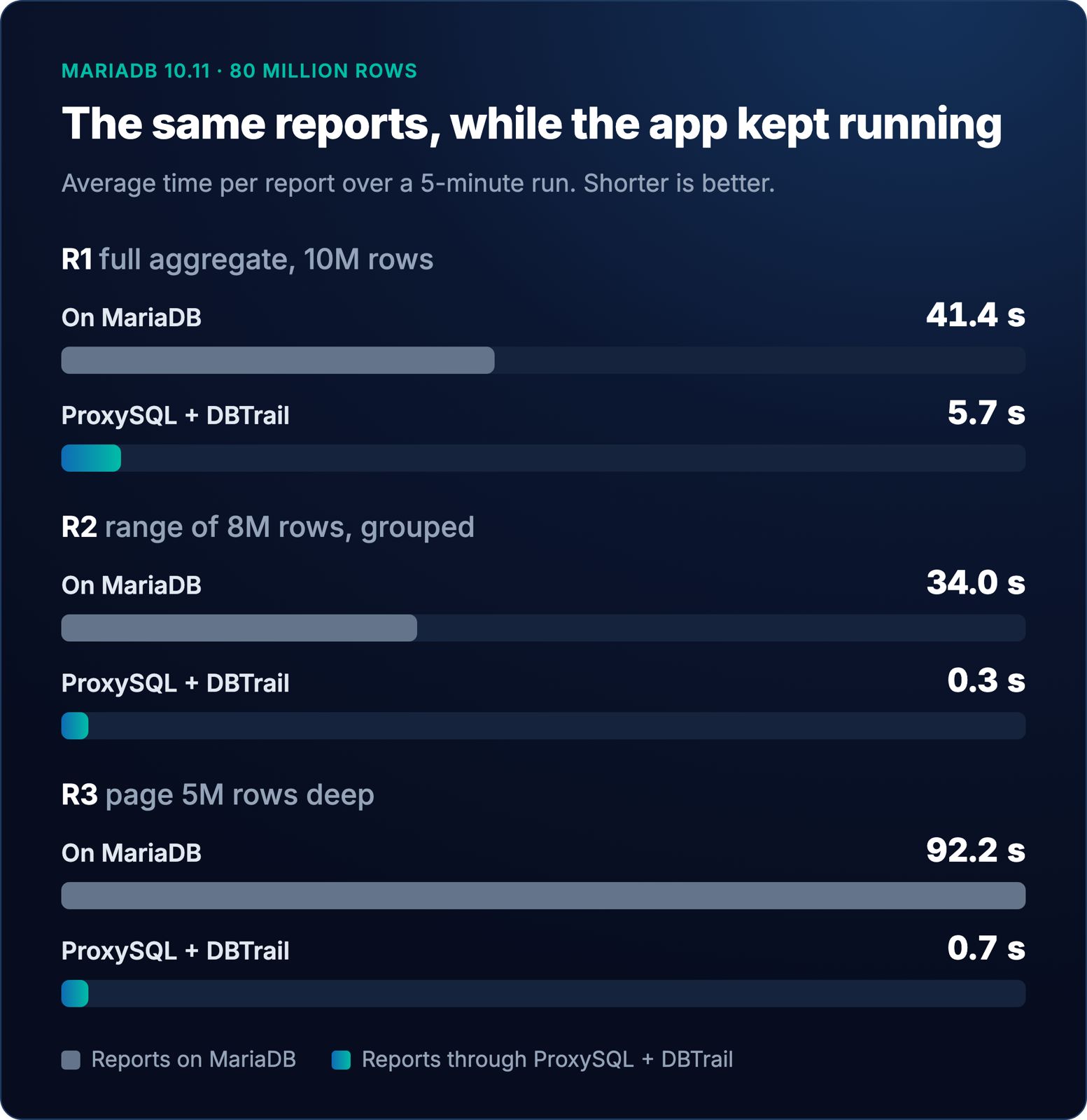
Per report, averaged over the run:
| Report | On MariaDB | Through DBTrail |
|---|---|---|
| R1, full aggregate | 41.4 s | 5.7 s |
| R2, 8-million-row range | 34.0 s | 0.3 s |
| R3, deep page | 92.2 s | 0.7 s |
So in the DBTrail run there were 22 times as many reports, and the application didn’t notice them. DBTrail’s router counted 267 statements answered by the copy and none of the reports went to MariaDB.
One thing we did not measure under load: the cost of the extra hop for a light read that DBTrail passes on to MariaDB. In this test the application’s reads never took that path. Idle, a lookup by primary key through DBTrail and back to MariaDB took 1 ms.
How far behind is the copy?
The copy follows MariaDB’s binary log, so it’s behind by however long it takes to apply each change. We measured it during a run with the application and the reports going: an UPDATE on MariaDB, then a query through DBTrail every 0.2 seconds until the copy showed the new value. Ten tries came back after 0.87, 1.11, 1.11, 1.12, 1.12, 2.17, 2.45, 2.71, 2.72 and 2.99 seconds.
That’s with fresh mode on (SQL_FRESH=on). It’s a setting for the whole DBTrail install, not per server. Without it, the copy is as new as its last scheduled update.
The probe table had no index on the column we filtered by, so every probe was a full scan and went to the copy. We checked the router’s counter for each one. Our first attempt filtered on an indexed column, and those probes came back in 50 ms because the router, correctly, sent them to MariaDB. A freshness test has to make sure it’s reading the copy.
The bug the test found
The first runs, on DBTrail 0.127.0, were not this clean. The application’s p95 jumped to 1.6 and 2.4 seconds in the first 20 seconds of every DBTrail run, then settled at 14 ms. The router’s counters said why: R2 was never answered by the copy. It went to MariaDB every time, as a “cheap plan”.
DBTrail’s router decides from the source’s EXPLAIN FORMAT=JSON. On MySQL that plan carries a cost, and a high cost sends the query to the copy. MariaDB’s plan has no cost, so on MariaDB the router uses rules on what the plan reads: a full table scan over 100,000 rows, a full index scan, a large join. A range read was not one of them. WHERE id BETWEEN 1 AND 8000000 reads 8 million rows through the primary key, and the router let it through to MariaDB. The first time each run, those 8 million rows came from disk and pushed the application out of the buffer pool.
DBTrail 0.128.0 adds the missing rule: on a plan with no cost, a range read of 100,000 rows or more goes to the copy (the same --route-scan-rows threshold as the full scan). One exception stays on MariaDB: a range with a LIMIT and no sort, where the index alone decides which rows match. MariaDB stops after the first rows, so it’s page one of something and fast through the index. If the query also filters on columns the index doesn’t cover, MariaDB may read far more rows to fill the page, so that one goes to the copy. The final runs above are on 0.128.0.
A report that stays on MariaDB on purpose
Our first version of R2 grouped by the first two characters of a text column (GROUP BY LEFT(c, 2)). With 0.128.0 the router judged it heavy, and then the copy refused to answer it, so it went to MariaDB anyway. That was correct.
The column holds values with - in them, and the copy sorts those characters differently from MariaDB’s collation. A GROUP BY with an ORDER BY on that column could come back in a different order, or grouped differently, than MariaDB would return it. When the copy can’t promise the same answer as MariaDB, DBTrail sends the query to MariaDB. Text with accents is the other common case.
So we changed R2 to group by a number. Through DBTrail it took 0.22 seconds and returned the same 1,000 rows as MariaDB, byte for byte (3.6 seconds on an idle MariaDB). If your heavy reports group or sort by text with hyphens or accents, expect some of them to stay on MariaDB, and check the router’s counters (SHOW ROUTER STATUS, the reason_copy_columns_differ line) to see which.
A new table
Tables you create after the first copy aren’t in it until the next scheduled update, and including one takes a full read: 4 minutes 29 seconds for our 80 million rows. Until then the copy refuses the table and the router sends its queries to MariaDB, so the answers are right and just not faster.
What MariaDB built for the same problem
MariaDB has its own answer for this: MariaDB Exa, powered by Exasol, announced on October 22, 2025. We did not run it, so there are no Exa numbers here, ours or theirs. What follows comes from MariaDB’s operational analytics page, the press release and the MaxScale Exasolrouter documentation.
The shape is the same: one connection, writes to MariaDB, analytical reads to a columnar engine that a change stream from the binary log keeps up to date. In MariaDB’s version the front door is MaxScale; in ours it’s ProxySQL. The parts are different.
| Aspect | MariaDB Exa | ProxySQL + DBTrail |
|---|---|---|
| Which MariaDB | MariaDB Enterprise Platform 2026: Exa is “an add-on option” to it | Any MariaDB with row-based binary logging. This test used MariaDB Community 10.11 from Ubuntu’s packages |
| License | Commercial add-on | Both open source: ProxySQL under GPL v3, DBTrail under Apache 2.0 |
| The one connection the app uses | A MaxScale listener running SmartRouter | ProxySQL |
| What keeps writes on MariaDB | SmartRouter: “all writes are directed to MariaDB” | ProxySQL’s query rules: writes, transactions and locking reads go to MariaDB |
| What decides where a read goes | MaxScale’s SmartRouter. It groups queries by shape and sends each shape to the backend whose “measured response times” were better, and “periodically reevaluates its decision” | ProxySQL sends reads to DBTrail. DBTrail’s router reads MariaDB’s EXPLAIN of each statement before it runs, answers heavy ones from the copy and passes light ones on to MariaDB |
| Analytical engine | Exasol, a separate database | DuckDB reading DBTrail’s Parquet copy |
| Keeping the copy current | A separate MaxScale binlogrouter service reads the binary log, loads batches into Exasol staging tables and MERGEs them. “Replication is asynchronous.” It needs MaxScale 26.10 or later | DBTrail reads the binary log itself |
| Processor | x86_64: “Exa cannot run on ARM processors” | ProxySQL and DBTrail both ran on ARM in this test |
| Other requirements | Python 3.13 or later for the router’s SQL preprocessor (3.12 on Ubuntu 24.04) | None beyond the installs |
| Who the reads run as | ”Exasol access is limited to a single service user” | Reads DBTrail passes on to MariaDB run as one forwarding user per server, whose grants decide what the app can read |
Two of these are worth a closer look.
Timing versus planning. SmartRouter learns from what actually happened: it times each query shape and keeps whichever backend answered faster. DBTrail decides before running anything, from the plan, which is why a gap in the rules (the range read above) sent a heavy query to the wrong place until it was fixed in DBTrail 0.128.0. A router that times queries doesn’t have that kind of gap. It has to measure a query shape before it knows where it belongs.
When the analytical side can’t answer. The Exasolrouter documentation says that if Exasol is unavailable, SmartRouter sends all reads and writes to MariaDB, and that “the CDC pipeline itself has no automatic failover”: if the MaxScale running it goes down, it resumes from its saved position when restarted. In DBTrail, a query the copy can’t answer (a table not in it yet, text it sorts differently) goes to MariaDB. If the DBTrail machine itself is down, ProxySQL has no server left in hostgroup 20, and those reads fail unless your setup gives them somewhere else to go.
Run it yourself
The following script runs one benchmark on the ProxySQL machine. It expects Linux, Bash, the mysql client, sysbench, and bc. Use a dedicated test instance: the script replaces all query rules in ProxySQL’s in-memory configuration and loads them to runtime. Set ADMIN_PW and APP_PW to ProxySQL’s admin password and the application’s password first; the hostgroups and the application user are set up as in the ProxySQL guide.
#!/bin/bash
# Usage: run.sh <label> <rules: none|dbtrail> <reports: 0|1> [seconds]
#   none    : every statement goes to MariaDB (hostgroup 10)
#   dbtrail : locking SELECTs to MariaDB, other SELECTs to DBTrail (hostgroup 20)
set -u
LABEL=$1; RULES=$2; REPORTS=$3; SECS=${4:-300}
OUT="$HOME/results/$LABEL"; mkdir -p "$OUT"
ADMIN=(mysql -h127.0.0.1 -P6032 -uadmin "-p$ADMIN_PW" -N)
APP=(mysql -h127.0.0.1 -P6033 -uapp "-p$APP_PW" sbtest -N)

"${ADMIN[@]}" -e "DELETE FROM mysql_query_rules;"
if [ "$RULES" = dbtrail ]; then
  "${ADMIN[@]}" -e "INSERT INTO mysql_query_rules (rule_id, active, match_digest, destination_hostgroup, apply) VALUES
    (1, 1, '^SELECT .* (FOR (UPDATE|SHARE)|LOCK IN SHARE MODE)', 10, 1), (2, 1, '^SELECT ', 20, 1);"
fi
"${ADMIN[@]}" -e "LOAD MYSQL QUERY RULES TO RUNTIME; SELECT * FROM stats_mysql_query_digest_reset LIMIT 0;"

R1="SELECT k % 100 AS bucket, COUNT(*), AVG(LENGTH(c)) FROM sbtest1 GROUP BY bucket ORDER BY bucket"
R2="SELECT k % 1000 AS b, COUNT(*), SUM(id) FROM sbtest2 WHERE id BETWEEN 1 AND 8000000 GROUP BY b ORDER BY b"
R3="SELECT id, k FROM sbtest3 ORDER BY k LIMIT 20 OFFSET 5000000"

report_loop() {  # runs R1, R2, R3 in turn until the deadline
  local end=$(( $(date +%s) + SECS ))
  while [ "$(date +%s)" -lt "$end" ]; do
    for q in R1 R2 R3; do
      local t0=$(date +%s.%N)
      if "${APP[@]}" -e "${!q}" >/dev/null 2>>"$OUT/err-$1.txt"; then s=ok; else s=error; fi
      echo "$q $s $(echo "$(date +%s.%N) - $t0" | bc)" >> "$OUT/reports-$1.txt"
      [ "$(date +%s)" -ge "$end" ] && break
    done
  done
}

if [ "$REPORTS" = 1 ]; then report_loop a & report_loop b & fi
sysbench oltp_read_write --db-driver=mysql --mysql-host=127.0.0.1 --mysql-port=6033 \
  --mysql-user=app --mysql-password="$APP_PW" --mysql-db=sbtest --tables=8 --table-size=10000000 \
  --threads=16 --rate=400 --time="$SECS" --report-interval=10 --percentile=95 \
  run > "$OUT/sysbench.txt" 2>&1
wait
"${ADMIN[@]}" -e "SELECT hostgroup, SUM(count_star) FROM stats_mysql_query_digest GROUP BY hostgroup" > "$OUT/per-hostgroup.txt"
The runs, in order: run.sh warm none 0 180, run.sh mariadb none 1, a two-minute pause, run.sh warm2 none 0 180, run.sh dbtrail dbtrail 1. On the DBTrail side: the Docker Compose installation, the MariaDB server added with a baseline, routing on (Steps 1 to 5 of Run MySQL and DuckDB on the same connection), and SQL_FRESH=on in the compose environment for the freshness numbers. To see where each statement went, connect to DBTrail’s port 3309 and run SHOW ROUTER STATUS;.