PostgreSQL Replication Sandboxes with ProxySQL via dbdeployer

At Percona Live Bay Area 2026 we presented ProxySQL – A Perfect Complement to Your PostgreSQL Database and described how ProxySQL can act as a PostgreSQL data gateway offering connection pooling, read/write routing, and proxy-side observability in one place.
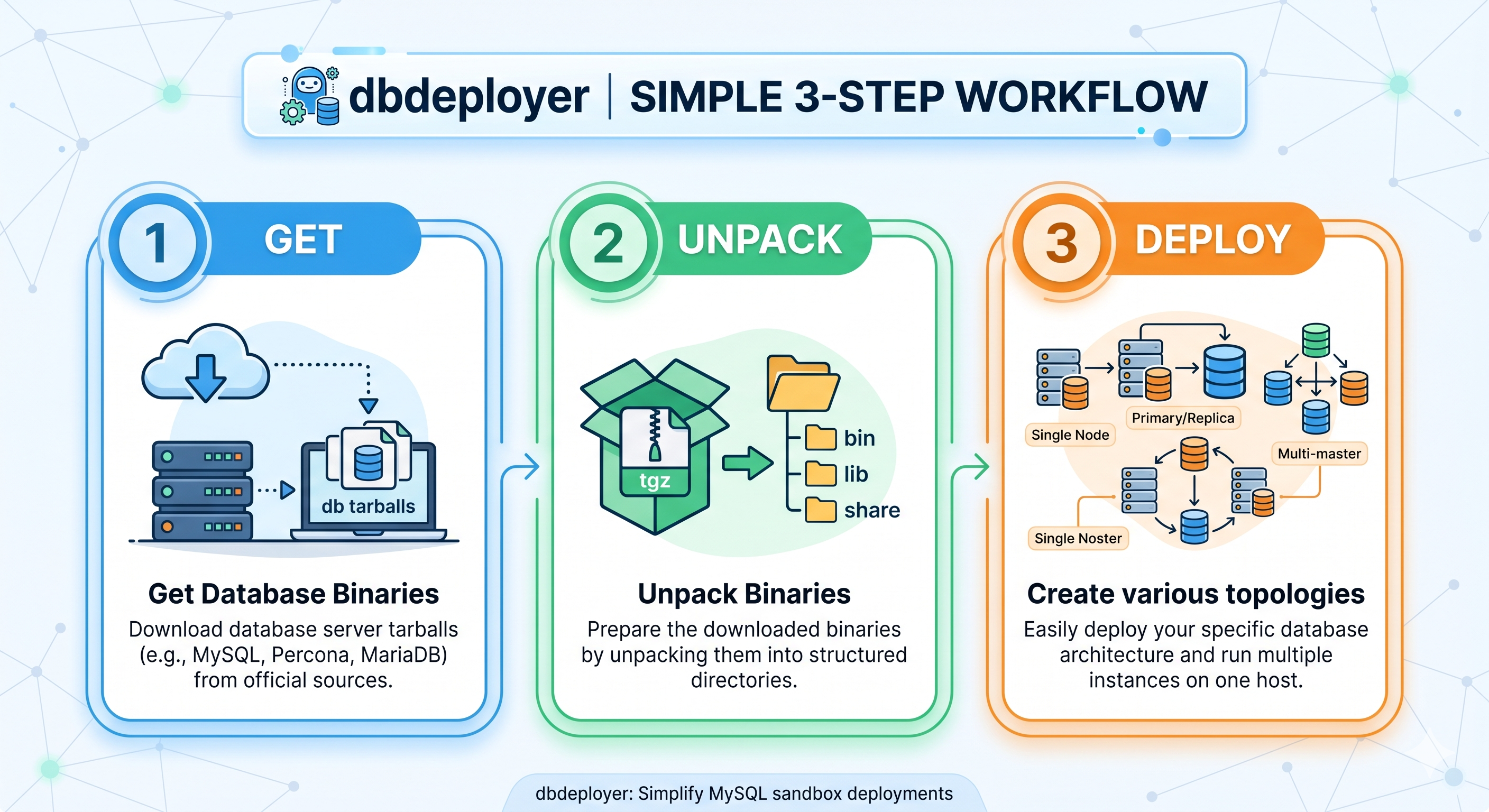
dbdeployer is a long-time established product for MySQL sandboxes. You can now quickly deploy PostgreSQL sandboxes; covering versions 12-18; and ProxySQL 3.0.x in three steps. The entire flow takes a few minutes once a Linux VM is provisioned with some depencency packages. Sandboxes are user-based and do not require any superuser privileges.
Three Steps
- GET: Download database binaries for your version.
- UNPACK: Prepare the binaries by unpacking into per-user environment
~/opt/postgresql/<version> - DEPLOY: Use the ready components to create a variety of topologies, such as a single node, primary/replica setups, or multi-node clusters available in
/sandboxes/<name>.
For convenience and timing in a conference presentation setting, the VM demo environments were created on a Mac using OrbStack without the need to provision a cloud-based VM. In a later post we will publish instrutions for cloud-based VM deployments.
Prerequisites
On your Mac:
brew install orbstack
orbctl version
orbctl create --help

Supported distros: alma  alpine  arch  centos  debian  devuan  fedora  gentoo  kali  nixos  openeuler  opensuse  oracle  rocky  ubuntu  void
Supported CPU architectures: arm64  amd64
You also need the demo cloud-init file dbdeployer.yaml currently available here.
Step 0 — Provision the VM
The following presentation examples work with Ubuntu (e.g. 24.04) and Debian OS (e.g. 12).
DISTRO="ubuntu"
VERSION="24.04"
VM_NAME="${DISTRO}$(echo ${VERSION} | tr -d '.')"
CLOUD_INIT="dbdeployer.yaml"

orb create ${DISTRO}:${VERSION} ${VM_NAME} -c ${CLOUD_INIT}
orb -m ${VM_NAME} tail -50 /var/log/cloud-init-output.log
When the launch and cloud-init finishes you can spot check dependencies and possible PostgreSQL versions available for the OS:
ssh ${VM_NAME}@orb
dbdeployer --version
proxysql --version
apt-cache search postgresql | grep -E '^postgresql-[0-9]+ ' | sort
Using the Linux Download instructions the following are available.
postgresql-10 - The World's Most Advanced Open Source Relational Database
postgresql-11 - The World's Most Advanced Open Source Relational Database
postgresql-12 - The World's Most Advanced Open Source Relational Database
postgresql-13 - The World's Most Advanced Open Source Relational Database
postgresql-14 - The World's Most Advanced Open Source Relational Database
postgresql-15 - The World's Most Advanced Open Source Relational Database
postgresql-16 - The World's Most Advanced Open Source Relational Database
postgresql-17 - The World's Most Advanced Open Source Relational Database
postgresql-18 - The World's Most Advanced Open Source Relational Database
Step 1 — Get the binaries / Step 2 - Unpack the binaries
For simplicity of versions 12-18, we combine these one-off steps on your VM.
apt-get download libpq5
for PG_VERSION in $(seq 12 18); do
  echo "Prepping ${PG_VERSION}"
  apt-get download postgresql-${PG_VERSION} postgresql-client-${PG_VERSION}
  dbdeployer unpack --provider=postgresql postgresql*${PG_VERSION}*.deb libpq5_*.deb
done
echo "Installed binary versions  $(ls ~/opt/postgresql | tr '\n' ' ')"
This provides these possible versions for PostgreSQL sandboxes.
Installed binary versions 12.22 13.23 15.18 16.14 17.10 18.4Step 3 — Deploy a replication topology with ProxySQL
Pick a version you unpacked (example: PostgreSQL 18.4) and you can deploy a variety of different configuration topologies with a single command. The following replication is the default HA topology with a primary and 2 replicas.
PG_VERSION=18
PG_MINOR_VERSION=$(basename $(ls -d ~/opt/postgresql/${PG_VERSION}* | head -1))

dbdeployer deploy replication ${PG_MINOR_VERSION} \
  --provider=postgresql \
  --sandbox-directory=demo${PG_VERSION} \
  --with-proxysql \
  --force
This creates 3 PostgreSQL servers, a ProxySQL server and simpled name commands to leverage:
| Component | Location | Port (PG 18.4 example) |
|---|---|---|
| Primary | ~/sandboxes/demo18/primary/ | 16804 |
| Replica 1 | ~/sandboxes/demo18/replica1/ | 16805 |
| Replica 2 | ~/sandboxes/demo18/replica2/ | 16806 |
| ProxySQL admin | ~/sandboxes/demo18/proxysql/ | 6132 |
| ProxySQL proxy | same | 6133 |
Each node gets lifecycle scripts including: start, stop, status, restart, use, bench.
For the topology several other scripts available include check-replication and test-replication.
Verify replication
cd ~/sandboxes/demo18

./check_replication
./test_replication
Connect directly to the primary:
./primary/use -c "SELECT version();"Connect through ProxySQL admin (PostgreSQL protocol):
./proxysql/use -c "SELECT 1"Connect through the proxy port as the application user:
./proxysql/use_proxy -c "SELECT 1"Benchmarking
The topology includes a bench helper that initializes a small TPC-B dataset (if needed) and runs a 30-second pgbench benchmark against the default rsandbox database.
** Connecting directly to the Primary:**
./benchConnecting through ProxySQL:
./bench --proxysqlVerifying traffic
In a separate window an easy way to monitor WAL operations is:
watch --differences ./check-replicationWhen using ProxySQL, you can connect to the ProxySQL admin interface and monitor connection and statement operations via SQL.
./proxysql/useConnection pool status
SELECT
    hostgroup,
    srv_host,
    srv_port,
    status,
    ConnUsed,
    ConnFree,
    ConnOK,
    ConnERR,
    MaxConnUsed,
    Latency_us
FROM stats.stats_pgsql_connection_pool
ORDER BY hostgroup, srv_host;
Top queries by execution count
SELECT
    hostgroup,
    database,
    username,
    client_address,
    SUBSTRING(digest_text, 1, 50)           AS digest_short,
    count_star                              AS executions,
    sum_time                                AS total_time_us,
    ROUND(sum_time / count_star, 0)         AS avg_time_us,
    min_time                                AS min_time_us,
    max_time                                AS max_time_us,
    sum_rows_affected,
    sum_rows_sent
FROM stats.stats_pgsql_query_digest
WHERE digest_text LIKE 'SELECT%'
ORDER BY executions DESC, avg_time_us DESC
LIMIT 5;
Top queries by total backend time
SELECT
    hostgroup,
    SUBSTRING(digest_text, 1, 50) AS digest_short,
    count_star AS executions,
    sum_time AS total_time_us,
    ROUND(sum_time / count_star, 0) AS avg_time_us
FROM stats.stats_pgsql_query_digest
ORDER BY sum_time DESC
LIMIT 20;
Watch stats live (Linux VM)
You can save a query to a file, and you can watch the traffic with:
watch -n 2 --differences 'bash ./proxysql/use -f /tmp/pgsql_digest_top5.sql'Ongoing development
PostgreSQL sandboxes currently work using apt packages on Ubuntu/Debian platforms. Providing rpm options for CentOS/RedHat/Fedora is currently planned.
What’s next
- Read the PgBouncer → ProxySQL migration series for benchmark comparisons and routing depth
- Try the Docker tutorials for container-based walkthroughs
- Follow dbdeployer development at github.com/ProxySQL/dbdeployer
This demo environment is designed for local evaluation, conference workshops, and reproducible benchmarks — the same workflow we used on stage at Percona Live, now in a form you can run on any Mac with OrbStack.